 As regular readers of GNC will know, I’ve reviewed a fair number of gadgets over the years, but I’ve never laid my hands on a full Android TV device. I’ve tried most of the others: Chromecasts, Rokus and Amazon Fire TV Sticks, so when SuperBox offered the opportunity to review their SuperBox S7 Pro, I was keen to give it a whirl. Continuing my series in “Dropping the Dish”, I’ve always wanted an “Android-in-a-box” that could offer a bit more than a simple media streamer. With that in mind, let’s take a look.
 The SuperBox S7 Pro comes in a tidy box that’s size-appropriate for the device. As you’d expect there’s a summary of its features on the outside – gigabit Ethernet, WiFi 6, 4 GB + 32 GB – and extols its credentials of R&D in the USA and manufactured in China. Opening the box up, inside there’s the SuperBox S7 smart media player itself, a remote control, a US-style power adaptor, HDMI cable and user guide. I’m based in UK so the power adaptor wasn’t much use but as it delivers the power through a USB C connector, it wasn’t difficult to find a replacement. You’ll need a couple of AAA batteries for the remote too.
The S7 Pro is relatively unremarkable apart from an old-school LED panel on the front and two wifi antennae on the rear. Also on the back is the power port, jacks for an IR blaster and AV connector (in case you don’t have HDMI), HDMI, Ethernet and an audio SP/DIF socket. On the right side are a memory card slot, USB C and USB A ports. The USB A port appears to support mice and keyboards, although you’re more likely to be connecting with Bluetooth – but see my issue with Bluetooth keyboards below. In terms of build quality, the S7 Pro has a plastic case which seems fairly solid, though for a metal case, take a look at the S7 Max which comes in a fetching blue.
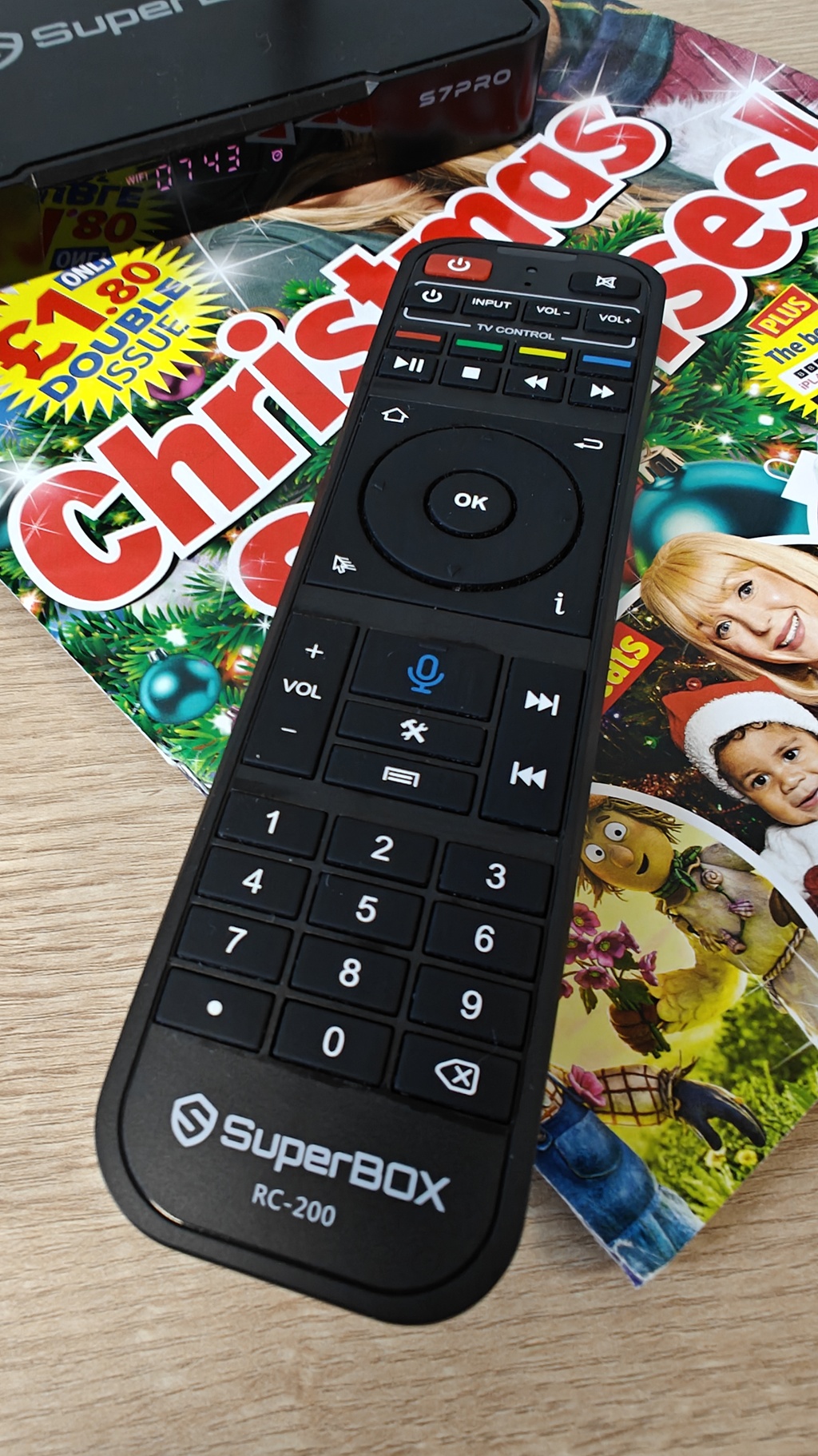 Turning to the remote control, it appears pretty comprehensive with a numeric pad at the bottom, media at the top and thumb controls in the middle. The remote has both IR and Bluetooth connectivity and is a voice remote so you can speak through it for some actions. With a curved back, it feels good in the hand. It has learning features, so can replace other IR remotes for basic TV control functions.
Plugging in the S7 Pro, getting setup is straightforward. If you don’t have the advantage of a wired connection, the main step is connecting the box to the local WiFi and it’s largely plain sailing from then on. The S7 Pro runs Android 12 which is a little bit behind the latest and older Android users will recognise some icons that have been swapped out. The front end is heavily customised but most people will recognise it as Android. Google Play is there and once signed in to your Google account, you can access familiar apps and games. Well, mostly. We’ll come back to that in a second.
 The front end interface attempts to focus on what’s mostly likely to be need for a media player connected to a TV. There are main sections for “Live TV”, “VOD” (Video on Demand), “Playback” plus Apps, Browser and App Store. There’s a row along the bottom which can be used for adding favourite apps too. Each of the main sections can be customised with apps downloaded from Google Play, so you can put your TV-type apps in Live TV, Netflix and Paramount+ in VoD and, say, VLC in Playback. The SuperBox doesn’t really care what apps go – you can have whatever makes sense to yourself or your interests.
After a bit of tinkering with Google Play, you realise two things. One, not all apps are available to you and two, sometimes apps you’d expect to be available, aren’t. As I mentioned, I’m in UK and three of the four main terrestrial broadcasters have their apps available – ITV, Channel 4 and 5, and one doesn’t – BBC – which is a bit disappointing. It’s a similar situation with the main streaming services -Prime Video, Paramount+ and Apple TV+ are there but Netflix and Disney+ are not. The good news is that SuperBox has an additional app store that has a few of the missing apps, such as Netflix. To be clear, they’re not jail-broken apps and you still need a paid-for account to view content. Regardless, some of my favourites apps such as Pocket Casts were simply not available. Boo.
 The S7 Pro isn’t locked down so it offers the ability to load apps and app stores from outside of the Google Play store onto the device, which maybe attractive to some. Regardless of source owners are advised to check the legality of any apps that they choose to load and use.
There’s plenty of other things to like as well. There’s playback of videos, audio and pictures using built-in apps, or if you have a favourite like VLC, you can access media on your NAS or USB for display on the connected TV. If you want to review your holiday pictures with friends, it’s much easier to do it on the big screen rather than handing round your phone. There are apps like Plex and Kodi for connecting to libraries of content if you have that kind of setup. I don’t so I wasn’t able to test those. Further, my Synology NAS has a dedicated Photos app which gives an improved user interface that’s customised to fit with the Synology DiskStation.
 There is a limited amount of local storage on the S7 Pro, 32GB, and if you want more, the higher end models, Max and Ultra, give you more space for a price. Obviously for media, you can insert a USB memory stick. Here’s some pictures from a trip to Alton Towers viewed with the Gallery app on a USB memory stick.
Did I have any problems? A couple of minor ones. First, the voice search button on the remote always links into Google Assistant and not the search box that you might currently be in, which is really frustrating until you figure out that’s what’s going. You have to use the mic button next to the search box rather than the one on the remote. Second, inserting USB-based media wasn’t always picked up. I’m not sure if it was how the drive was formatted but it worked with some of my USB drives and not others. And finally, I couldn’t get a Bluetooth keyboard to connect – the PIN needed to key in for the pairing never appeared on screen. Pairing a Bluetooth mouse worked fine.
That pretty much covers everything that the S7 Pro offers. Overall, I was disappointed. Not by the SuperBox S7 Pro itself – it’s a capable device that simply needs a bit of polish – but it’s somewhat restricted by the limitations of Android TV. It’s not the fully featured Android I was looking for and too many apps are missing. It’s not helped by being Android 12 from 2021 either and my idea of “Android-in-a-box” remains a dream. Looking on the plus side, the S7 Pro has a really simple user interface that suits viewing from a distance and the S7 Pro remote control does a good job at navigating round the apps…but let’s talk about price.
This base Pro model costs a fairly hefty US$359 which isn’t cheap and is way more expensive than other Android TVs. If it had been a fully functional Android unit, I would have been happy to pay this but as it stands, it’s a bit on the pricey side. The open nature of the platform may be attractive to some.
If you are thinking of purchasing, SuperBox are offering $50 off with the code GEEKNEWS if purchased from their online store. There’s no kickback to me.